Quick Start: Borrow Assets
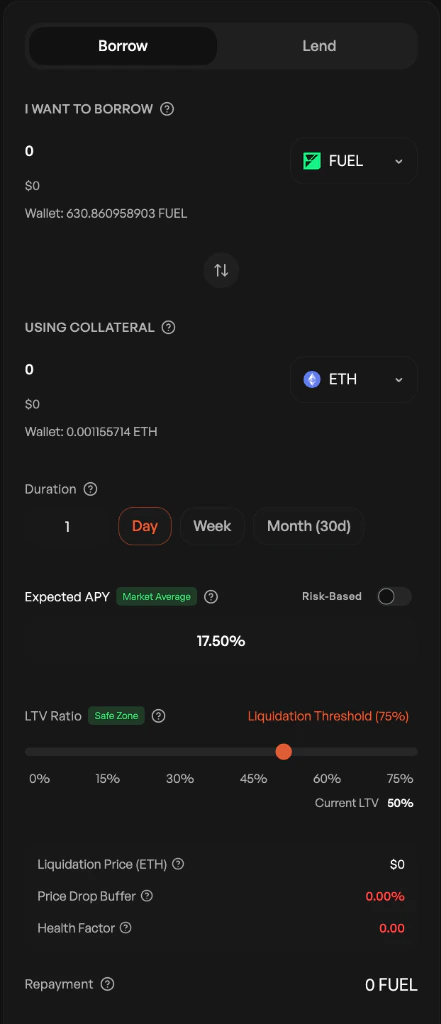
Step 1: Select Your Loan Terms
- Choose what to borrow: Select the asset and amount (e.g., 1,000 USDC)
- Set your collateral: Choose the asset you’ll deposit as security (e.g., ETH)
- Pick loan duration: 1 day, 1 week, or 1 month
- Set interest rate: Enter your offered APY or use the market average
→ The interface will calculate your repayment total and required collateral automatically
Step 2: Review Your Position
Check the following metrics:
- LTV Ratio: Should be in the “Safe Zone” (ideally 130-150%)
- Liquidation Threshold: The price at which your collateral gets liquidated
- Health Factor: Must stay above 1.00
→ These values update in real-time as you adjust amounts
Step 3: Confirm Your Request
- Click Create Borrow Request
- Approve the transaction in your wallet
→ Your request will appear in the Markets tab as “Pending”
Step 4: Wait for a Lender Match
Your request stays open until:
- A lender accepts your terms, OR
- You cancel the request, OR
- The expiration time is reached
→ You’ll receive a notification when a lender fills your request
Step 5: Receive Your Funds
Once matched:
- The borrowed amount arrives in your wallet immediately
- Your collateral is locked in the smart contract
- A countdown timer shows your repayment deadline
Step 6: Repay Before Deadline
- Go to your Dashboard
- Find your active loan
- Click Repay Loan
- Confirm the transaction
→ Your collateral is released automatically after repayment confirmation
What Happens If You’re Late?
- Liquidation: Your collateral is sold to repay the lender + penalty fees
Set calendar reminders 24-48 hours before your repayment deadline. You can repay early at any time.
